
What are statecharts? Coffee and donut examples
Learn how statecharts extend state machines with nested states, parallel states, and history. Explore state chart examples for a coffee and donut order.
A statechart is a way to describe how something behaves using states, events, and transitions. It extends a finite state machine with nested states, parallel states, and history, so you can model behavior without drawing every possible combination of states.
You'll also see the spelling state chart. It means the same thing.
Let's use coffee and donuts to see how statecharts work. We'll start with a coffee order, add the steps for making a latte, and then prepare a coffee and a donut together.
Start with a coffee order
Our coffee machine starts in Ready. An ORDER event moves it to Brewing. When brewing finishes, a BREWED event moves it to Served.
If you cancel while the coffee is brewing, the machine returns to Ready. Once the coffee is served, this order is complete.
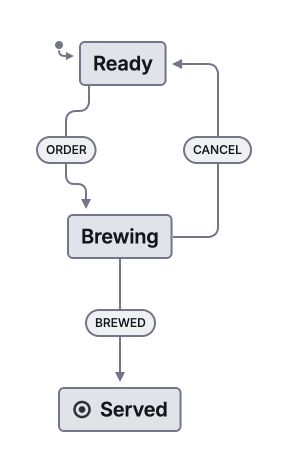
Explore the coffee order in Stately
Pan and zoom this read-only example. The screenshot above stays available if the interactive view cannot load. Open the example in a new tab.
The screenshot comes from the Stately editor. Open the read-only view below it to pan and zoom the same example. You don't need an account, and the example does not save changes.
This small model is also a finite state machine. You don't need every statechart feature to describe an order with three states.
Nested states: make it a latte
Making a latte takes a few steps. You grind the beans, brew the espresso, and steam the milk. All of those steps happen while you're Preparing the order.
We can put Grinding, Brewing, and Steaming milk inside Preparing. Preparing is a parent state, also called a compound state. The steps inside it are child states.
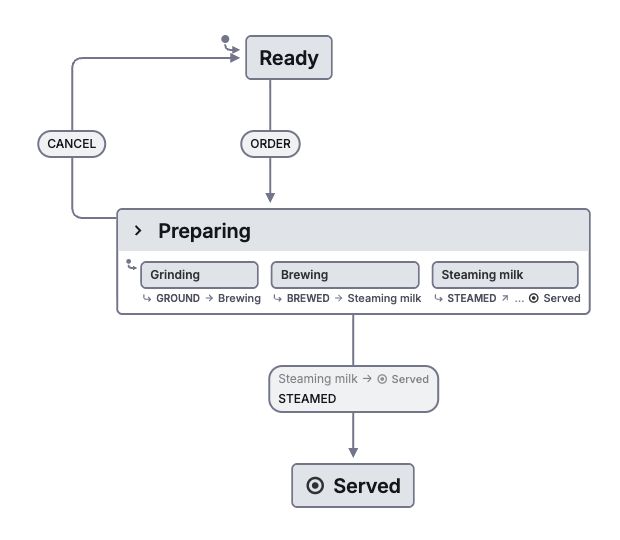
Explore the latte preparation in Stately
Pan and zoom this read-only example. The screenshot above stays available if the interactive view cannot load. Open the example in a new tab.
When Grinding is active, Preparing is active too. Within this compound state, one direct child is active at a time. GROUND moves Grinding to Brewing. BREWED moves Brewing to Steaming milk. STEAMED finishes preparation and moves the order to Served.
Notice where CANCEL belongs. You can cancel while grinding, brewing, or steaming, so we define the transition once on Preparing. We don't need to repeat it on each child state.
A child can handle an event before its parent does. If a child has no applicable transition for CANCEL, the parent can handle it. That lets you share behavior while still making exceptions where you need them.
Read more about parent and child states.
Parallel states: add a donut
Now the order includes a coffee and a glazed donut. The coffee can brew while someone glazes the donut. Either one might finish first.
Those are independent parts of Preparing, so we can model them as parallel regions. The Coffee region starts in Brewing. The Donut region starts in Glazing. Both regions are active.
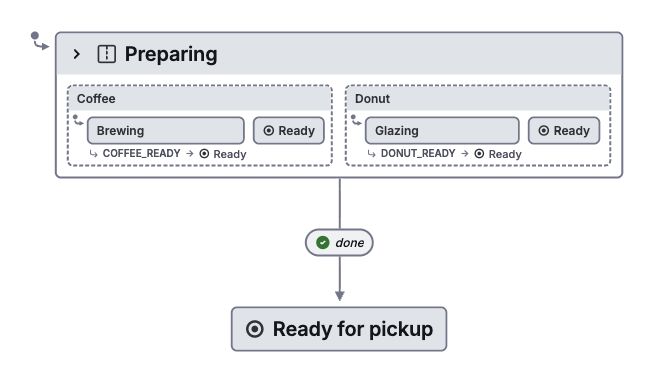
Explore the coffee and donut order in Stately
Pan and zoom this read-only example. The screenshot above stays available if the interactive view cannot load. Open the example in a new tab.
Send COFFEE_READY first, and the coffee finishes while the donut is still being glazed. Send DONUT_READY first, and the donut waits for the coffee. When both regions reach their final states, Preparing completes and the order moves to Ready for pickup.
Without parallel states, you might draw separate states for brewing-and-glazing, coffee-ready-and-glazing, brewing-and-donut-ready, and both-ready. Add another independent part of the order and the combinations grow again.
Parallel regions let you describe each part separately. They model things that can happen together; they don't require a separate JavaScript thread for each region.
Read more about parallel states.
History states: remember your donut order
Imagine a kiosk where you choose a donut, pick a filling, and pay. While choosing a filling, you open the help screen. Closing help should return you to the filling step, with your choices intact.
A history state remembers which child state was active when its parent was exited. Returning through history restores that state instead of always going back to the first step.
Shallow history remembers the parent's direct child. Deep history also remembers active descendants. For a first visit, when there's nothing to remember, the machine uses a default target or the parent's initial state.
History does not automatically save your order to a database. If the kiosk restarts, restoring the order requires persistence as well.
Read more about history states.
How to read a state chart
Start at the initial state and follow the events that occur. Here's the notation you'll encounter:
| Part | Meaning | Coffee shop example |
|---|---|---|
| A named box | A state the system can be in | Brewing |
| An arrow | A transition between states | Ready to Brewing |
| An event label | What can trigger a transition | ORDER, CANCEL, BREWED |
| A filled circle with an arrow | The initial state | Start in Ready |
| A state containing other states | A compound state | Preparing contains Grinding and Brewing |
| Parallel regions | Independent parts that are active together | Preparing coffee and a donut |
| A final-state marker | Completion of a machine or region | The coffee is ready |
A history marker, often H or H* | A previously active state to return to | Resume choosing a filling |
Tools have different drawing styles. The screenshots above use Stately's notation. A parallel region or final state might look different in another tool, but the model still needs to define what that state means.
An event does not have to change the state. In our first example, BREWED has no transition from Ready, so sending it there leaves the machine in Ready.
Guards and actions
Suppose the machine must have a cup before it can start brewing. A guard can check that condition when ORDER occurs. If the condition is false, that transition is not allowed.
An action performs work when a transition occurs or a state is entered or exited. Starting the pump when entering Brewing is an action. Checking whether a cup is present is a guard.
Keep those jobs separate. A guard decides whether a transition is allowed. It should not start the pump or charge the customer while checking a condition.
For work that takes time, such as waiting for a payment service, use an invoked actor. The statechart can describe success, failure, cancellation, and retry behavior around that work.
Run the coffee statechart with XState
A statechart can be executable code as well as a diagram. Here's our first coffee order in XState:
import { createActor, createMachine } from 'xstate';

const coffeeMachine = createMachine({
  id: 'coffee',
  initial: 'Ready',
  states: {
    Ready: {
      on: { ORDER: 'Brewing' },
    },
    Brewing: {
      on: {
        BREWED: 'Served',
        CANCEL: 'Ready',
      },
    },
    Served: { type: 'final' },
  },
});

const coffee = createActor(coffeeMachine).start();
coffee.send({ type: 'ORDER' });
coffee.send({ type: 'BREWED' });
console.log(coffee.getSnapshot().value); // 'Served'
Your application sends BREWED when brewing finishes. The machine reaches its final state and the actor completes. If you want to model another order, you can start another actor, or change the model so that it returns to Ready instead of ending.
The example files are available as JSON: coffee order, latte preparation, and coffee with a donut. The read-only views and screenshots use those same definitions.
Use the XState quick start to create an actor, send events, and observe its state.
Statecharts vs. state machines and flowcharts
A finite state machine defines a finite set of states and transitions between them. A statechart adds ways to organize that behavior, including hierarchy, parallel regions, and history. A finite statechart can be expressed as a flat state machine, but the flat version can require more states and repeated transitions.
A state diagram is a drawing of states and transitions. A statechart is a particular kind of behavioral model. Drawing boxes and arrows does not, by itself, define how events, nested states, or parallel regions behave.
A flowchart often describes a sequence of steps and decisions. A statechart makes the current state and its response to events explicit. A flowchart can explain the steps for making a latte. A statechart can also specify what happens when the customer cancels while the milk is steaming, or when the donut is ready before the coffee.
Statecharts are useful for user interfaces, order workflows, devices, and services that respond to events. A diagram alone does not provide database persistence, reliable message delivery, or payment guarantees. Those depend on the system executing it.
If your feature only needs a few states, keep it small. Add nested states when states share behavior. Add parallel regions when independent behaviors need to run together. Use history when returning to a previous state is part of the requirement.
Where statecharts come from
David Harel described statecharts in his 1987 paper Statecharts: A visual formalism for complex systems. Hierarchy and concurrency let a model express related and independent behavior without repeating every combination in a flat diagram.
Statecharts have several implementations and semantic variants, including UML state machines and SCXML. Check the rules for event processing, transition priority, and history when moving between tools.
Make your own statechart
Pick a feature you know well. Write down what can happen, which states it can happen in, and what should happen next. Include the failed payment, the cancelled order, and the retry.
Open the Stately statechart editor to draw your own coffee or donut workflow.
Try the sample simulation without an account. Sign in to create and edit your own machines.
For the broader introduction, read state machines and statecharts. For implementation details, explore states, transitions, guards, and actions.