# What are state machines and statecharts? (/docs/state-machines-and-statecharts)
State machines help us model how a process goes from state to state when an event occurs.
State machines are useful in software development because they help us capture all the states, events and transitions between them. Using state machines makes it easier to find impossible states and spot undesirable transitions.
State machines model your application logic. Below is the logic for a video player. When the video is Played, it is opened into fullscreen mode. When the video is stopped, it closes out of fullscreen mode. When the video player is in fullscreen mode, it can be *Playing* or *Paused*.
## Benefits of state machines
* **Simple to understand.** State machines are visual and simple to understand. They’re a great way to communicate with your team and stakeholders.
* **Simple to test.** State machines are deterministic, which means they’re simple to test. You can test all the possible states and transitions between them.
* **Simple to implement.** State machines are simple to implement in any programming language. You can use a library or write your own.
* **Simple to maintain.** State machines are simple to maintain because they’re simple to understand, test and implement.
* They provide a clear and concise way to model complex user interfaces and manage application state.
* State machines can help reduce complexity and improve maintainability by providing a structured way to manage state transitions and handle events.
* They can also help prevent bugs and improve code quality by enforcing a clear separation of concerns between different parts of the application.
* Additionally, state machines can be highly maintainable and offer a way to make very complex front-end processes much more manageable.
### In the backend
* State machines simplify the design and implementation of complex workflows, which can help reduce complexity and improve maintainability. [https://developers.redhat.com/articles/2021/11/23/how-design-state-machines-microservices](https://developers.redhat.com/articles/2021/11/23/how-design-state-machines-microservices)
## What is a statechart?
Statecharts extend traditional finite state machines to model more complex logic.
Statecharts are a visual extension to state machines that use boxes and arrows, much like flowcharts and sequence diagrams. Statecharts add extra features not available in ordinary state machines, including [hierarchy](parent-states), [concurrency](parallel-states) and [communication](actor-model).
When you make a state machine in [Stately Studio](https://stately.ai/editor), it’s also a statechart!
In Stately Studio, we refer to both state machines and statecharts as **state machines**.
## States
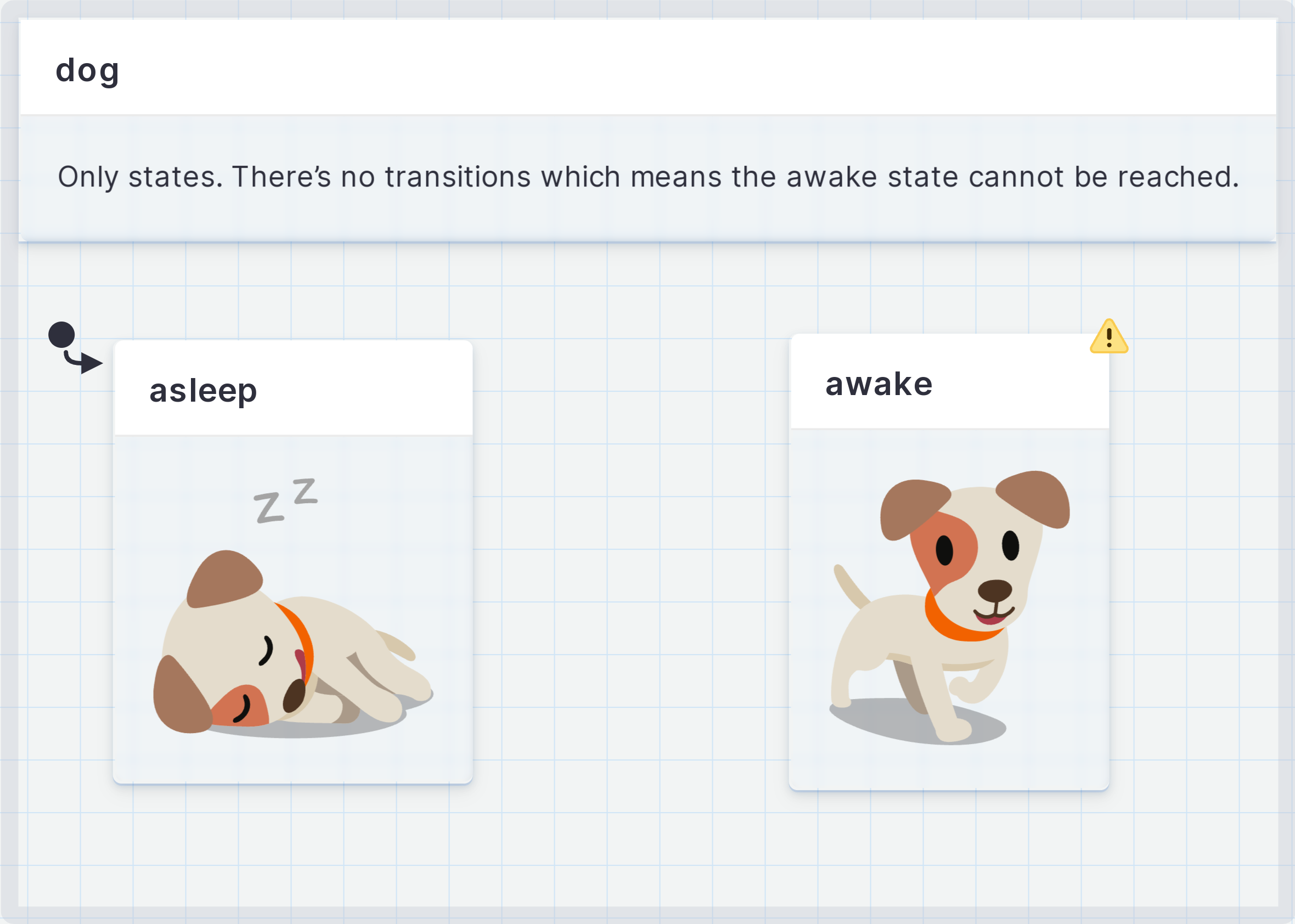
A state describes the machine’s status or mode, which could be as simple as *Asleep* and *Awake*. A state machine can only be in one state at a time.
{/* no alt because the image is already described in the surrounding text */}
{/*
*/}
[View the dog states machine in Stately Studio](https://stately.ai/registry/editor/1f84ff0d-fe41-4a92-ad5c-fadfa8b37ffb?machineId=469f2d59-551f-43cb-bfc0-e6f3ea0f9d87).
A dog is always **asleep** or **awake**. The dog can’t be asleep and awake at the same time, and it’s impossible for the dog to be neither asleep nor awake. There are only these two states, a precisely limited, *finite* number of states.
When a state machine starts, it enters the **initial state** first. A machine can only have one top-level initial state; if there were multiple initial states, the machine wouldn’t know where to start!
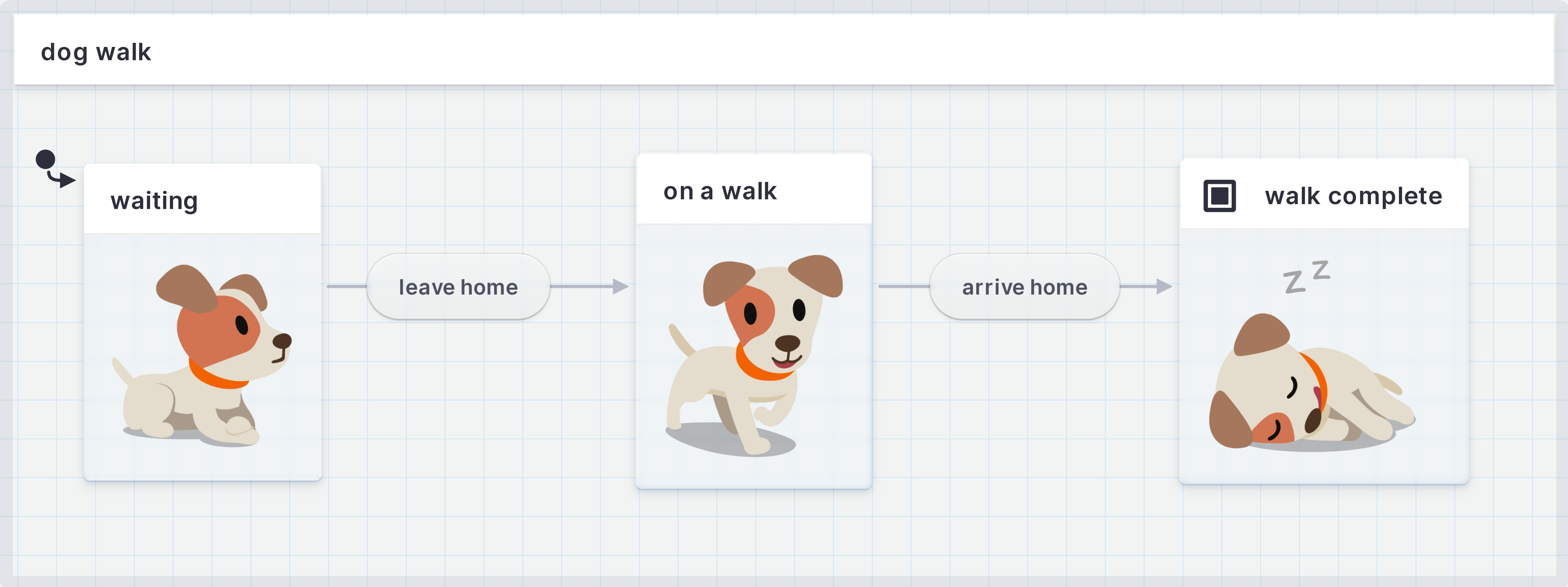
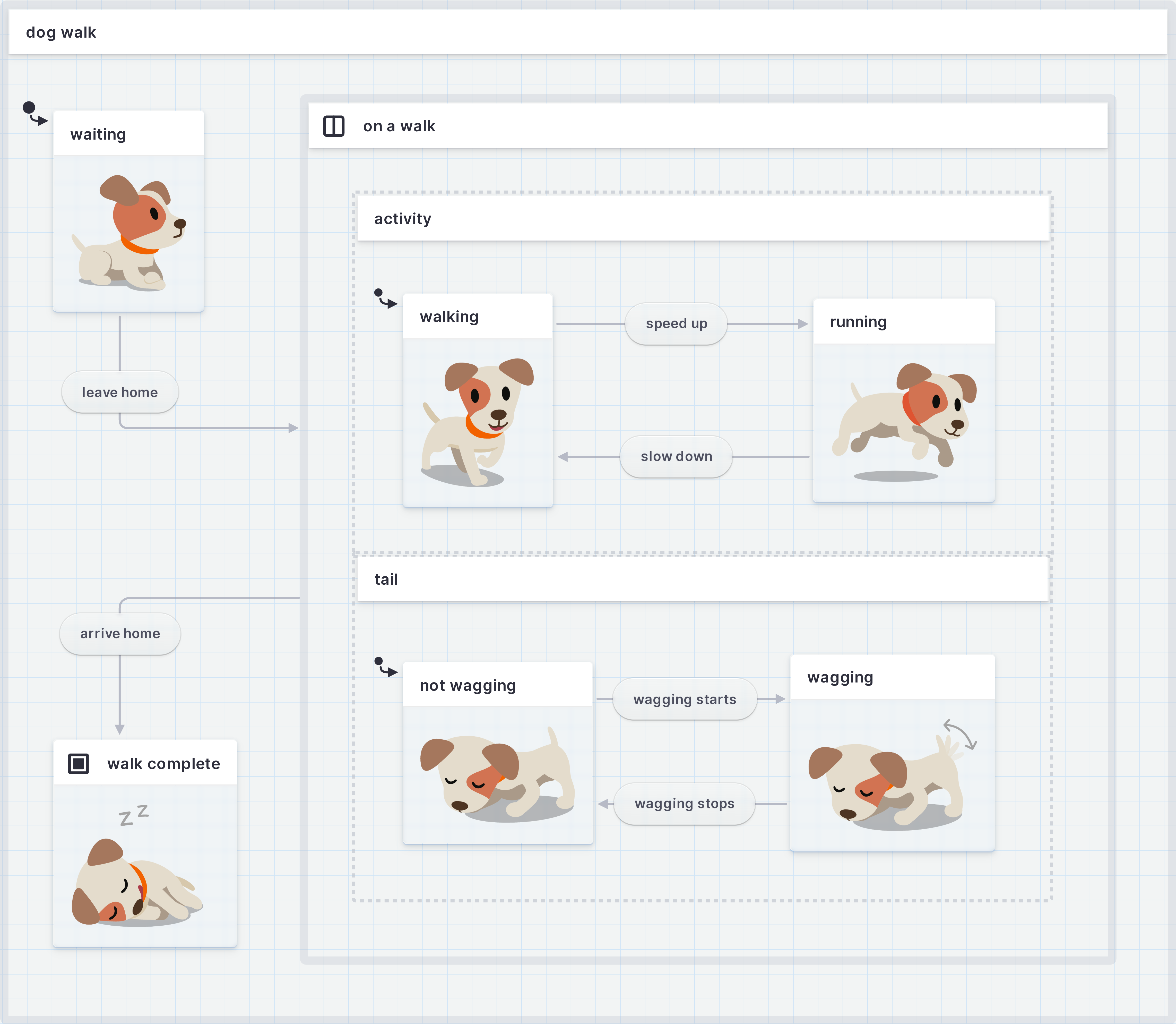
In this statechart describing the process of walking the dog, the initial state would be **waiting** to walk.
* [Read more about states](states).
* [Read more about finite states](finite-states).
* [Read more about initial states](initial-states).
### States in XState
States are defined in XState state machines inside the `states` property.
```ts
import { createMachine } from 'xstate';
const dogMachine = createMachine({
id: 'dog',
initial: 'asleep',
// [!code highlight:9]
states: {
asleep: {
// ...
},
awake: {
// ...
},
//...
},
});
```
### States in Stately Studio
The rounded rectangle boxes are states. [Read how to create states in Stately Studio](states).
## Transitions and events
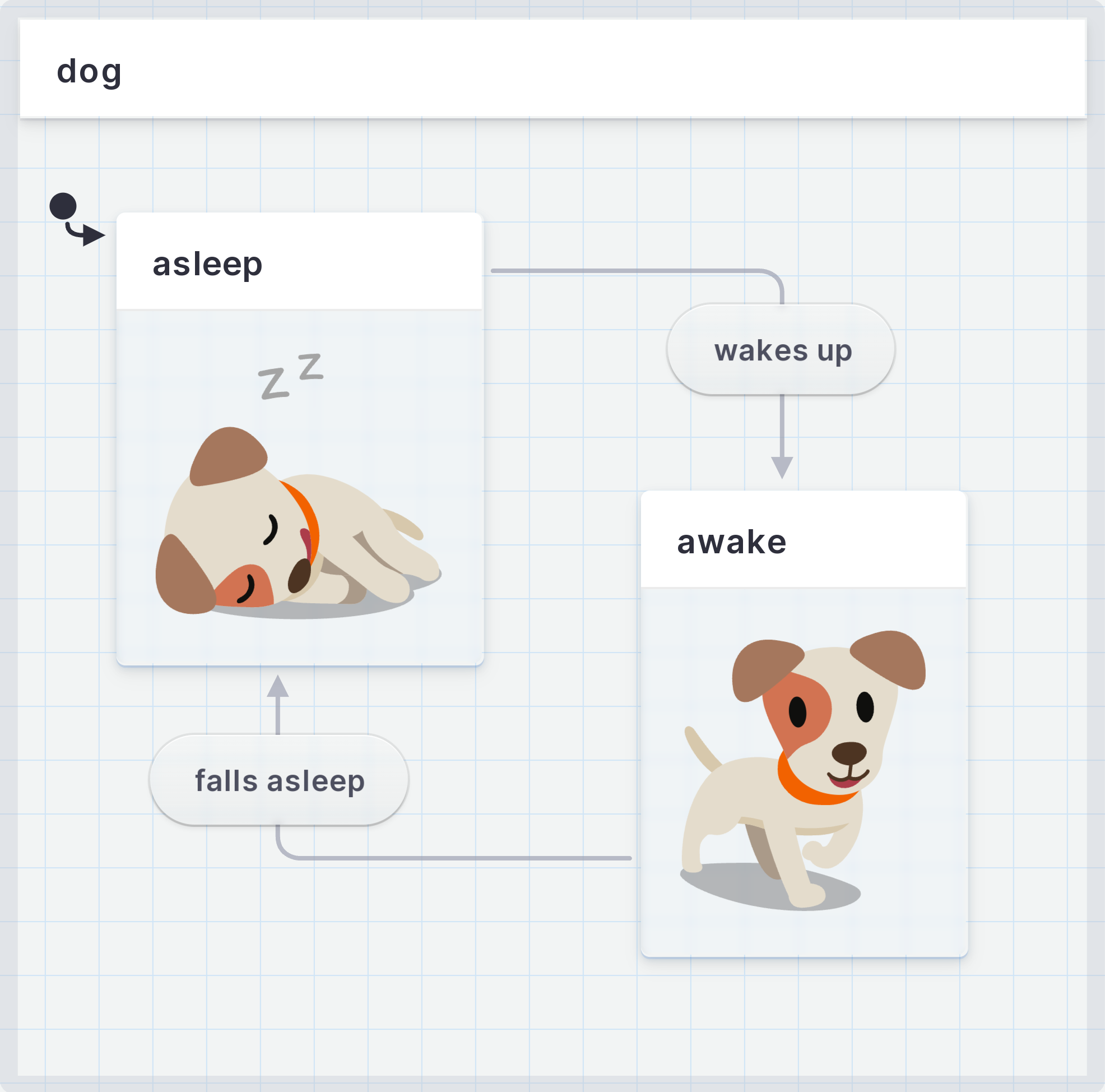
How the dog goes between **asleep** and **awake** is through **transitions**. Events cause transitions; when an event happens, the machine transitions to the next state. The dog goes between **asleep** and **awake** through the **wake up** and **fall asleep** events.
Transitions are “deterministic”; each combination of state and event always points to the same next state. Dogs never **wake up** to become **asleep** or **fall asleep** to become **awake**.
{/* no alt because the image is already described in the surrounding text */}
{/*
*/}
[View the dog states machine with events and transitions in Stately Studio](https://stately.ai/registry/editor/1f84ff0d-fe41-4a92-ad5c-fadfa8b37ffb?machineId=e48e774e-c31f-4e51-a934-6b795c12b2b9).
With its two finite states and transitions, this tiny dog process is a *Finite State Machine.* A state machine is used to describe the behavior of something. The machine describes the thing’s states and the transitions between those states. It’s a Finite State Machine because it has a finite number of states. (Sometimes abbreviated to FSM by folks who love jargon).
[Read more about transitions and events](transitions).
### Events and transitions in XState
Events and transitions are defined in XState state machines inside the `on` property of a state.
```ts
import { createMachine } from 'xstate';
const dogMachine = createMachine({
id: 'dog',
initial: 'asleep',
states: {
asleep: {
// [!code highlight:3]
on: {
'wakes up': 'awake',
},
},
awake: {
// [!code highlight:3]
on: {
'falls asleep': 'asleep',
},
},
//...
},
});
```
### Events and transitions in Stately Studio
In Stately Studio, the arrows are transitions, and the rounded rectangles on the arrow’s lines are events. Each transition has a **source** state which comes before the transition, and a **target** state, which comes after the transition. The transition’s arrow starts from the source state and points to the target state. [Read how to create events and transitions in Stately Studio](editor-states-and-transitions).
## Final state
Most processes with states will have a *final state*, the last state when the process is finished. The final state is represented by a double border on the state’s rounded rectangle box.
In the dog walking statechart, the final state would be **walk complete**.
{/*
*/}
[View the dog walk machine in Stately Studio](https://stately.ai/registry/editor/1f84ff0d-fe41-4a92-ad5c-fadfa8b37ffb?machineId=988d8d05-86ba-422a-8a28-d13cbf54d481).
[Read more about final states](final-states)
## Parent states
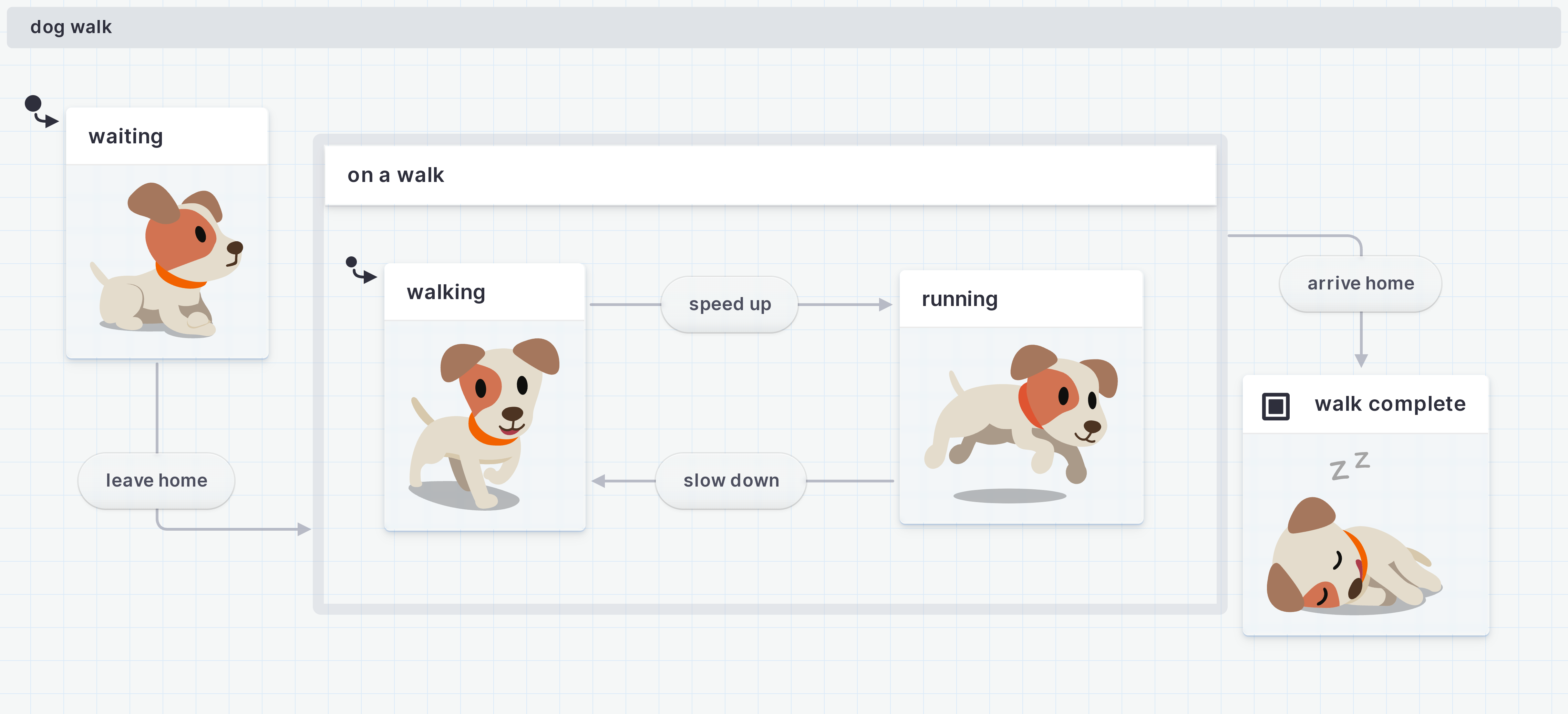
A parent state is a state that can contain more states, also known as child states. These child states can only happen when the parent state is happening. Inside the **on a walk** state, there could be the child states of **walking** and **running**.
A parent state is symbolised by a labelled rectangle box that acts as a container for its child states. Parent states are sometimes known as *compound states*.
{/* no alt because the image is already described in the surrounding text */}
{/*
*/}
[View the dog walk machine in Stately Studio](https://stately.ai/registry/editor/1f84ff0d-fe41-4a92-ad5c-fadfa8b37ffb?machineId=aa8a9c5d-8fd9-4e47-b71a-bda219cda066).
A parent state should also specify which child state is the initial state. In the **on a walk** parent state, the initial state is **walking**.
Parent and child states are one of the features that make statecharts capable of handling more complexity than an everyday state machine.
[Read more about parent states](parent-states).
## Atomic states
An atomic state is a state that doesn’t have any child states. **Waiting**, **walk complete**, **walking** and **running** are all atomic states.
## Parallel states
A parallel state is a state where all of its child states, also known as regions, are active simultaneously. The regions are separated inside the parallel state container by a dashed line.
Inside the **on a walk** parallel state, there could be two regions. One region contains the dog’s activity child states of **walking** and **running**, and the other region containing the dog’s tail states of **wagging** and **not wagging**. The dog can walk and wag its tail or run and wag its tail, it can also do both of these activities without wagging its tail.
{/* no alt because the image is already described in the surrounding text */}
{/*
*/}
[View the dog walk machine in Stately Studio](https://stately.ai/registry/editor/1f84ff0d-fe41-4a92-ad5c-fadfa8b37ffb?machineId=1f43dcd3-255c-40bf-b6b0-eba9a2bccb23).
Both regions should also specify which child state is the initial state. In our **tail** region, the initial state is **not wagging**.
[Read more about parallel states](parallel-states).
## Self-transition
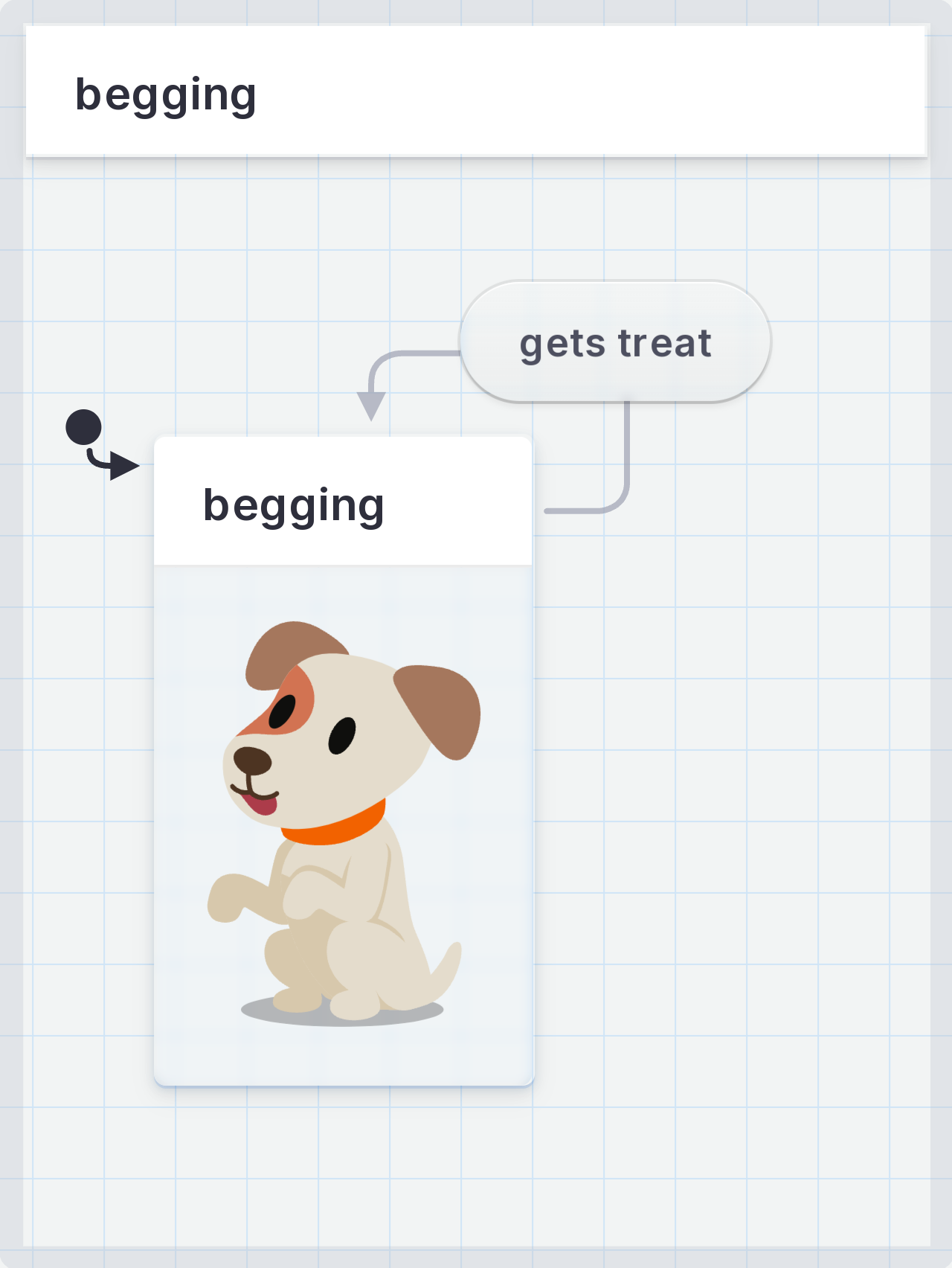
A self-transition is when an event happens, but the transition returns to the same state. The transition arrow exits and re-enters the same state.
A helpful way to describe a self-transition is “doing something, not going somewhere” in the process.
In a **dog begging** process, there would be a **begging** state with a **gets treat** event. And for the dogs who love their food, no matter how many times you go through the **gets treat** event, the dog returns to its **begging** state.
{/* no alt because the image is already described in the surrounding text */}
{/*
*/}
[View the dog begging machine in Stately Studio](https://stately.ai/registry/editor/17986605-400c-4c00-8b33-47e3ecca478b?machineId=933419cb-dd94-453c-a2b1-de2290c0a5a5).
[Read more about self transitions](/docs/transitions/#self-transitions)
## What next?
Now you know enough to get started in the [Stately Studio](https://stately.ai/editor?source=docs). Get an [overview of Stately Studio and its features](studio), or [continue to learn about XState](xstate).